Nest Navigator

Flowchart navigation
for Premiere Pro.
1080x1350_4X5_Artwork

Premiere Pro is powerful. But when a project gets deep - sequences inside sequences inside sequences - it can feel like navigating without a map. You know a nest exists somewhere. Finding it is another matter.

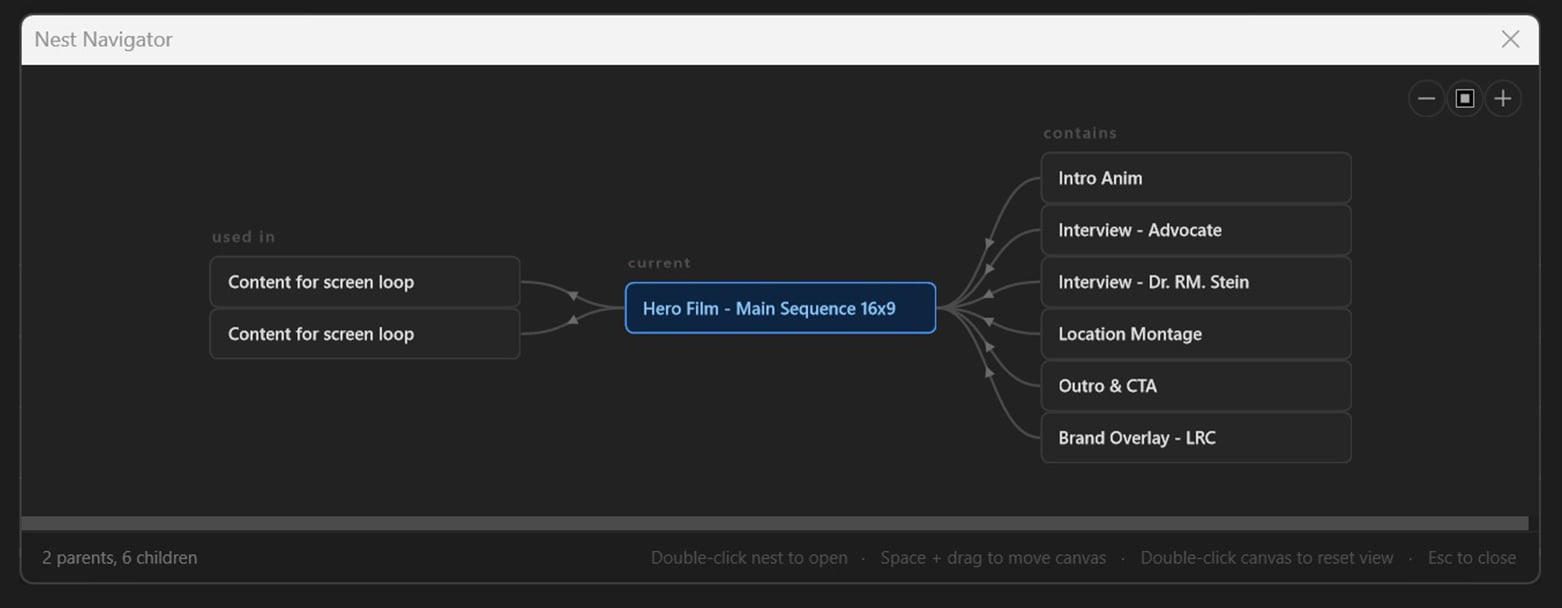
Nest Navigator fixes that. One keyboard shortcut opens a clean flowchart showing exactly where your current sequence sits in the hierarchy, what it contains, and what contains it. Click any node to jump there instantly. Close it and get back to work.

It's the flowchart view Premiere always should have had.

Features

✅ Instant hierarchy map - parents, current sequence, and all nested children in a single clear graph.
✅ Global keyboard shortcut -  trigger from anywhere in Premiere.
✅Zoom controls - fit the whole graph or zoom into complex hierarchies.
NN

How it works

What you get

Once purchased you will receive three files:
✅ A user guide including install instructions (under 2 mins).
✅ The Premiere tool (.CCX) - Simple double click to install to Creative Cloud.
✅ A Win tray app  / Mac menu bar app which listens for the shortcut and launches Nest Navigator.

System Requirements

Adobe Premiere Pro 26.0 or later
Windows 10/11 
mac Os Sequoria
macOs Tahoe

Frequently Asked Questions

What's the tray app?
Premiere doesn't allow plugins to register global keyboard shortcuts natively, so Nest Navigator includes a small companion app (.exe)/(.dmg) that sits silently in your system tray and handles the shortcut. It uses negligible resources and launches automatically on startup. You'll forget it's there. 
Can I use Nest Naviagtor without the tray app?
Yes! - The tray app is simply responsible for launching Nest Navigator via keyboard shortcuts. 
Even without the tray app Nest Navigator can be opened as a panel in Premiere Pro by selecting:
Window > UXP Plugins >  Nest Navigator > Nest Navigator.
This will launch a Nest Navigator button - you can dock this panel and activate Nest Navigator with a mouse click, instead of a keyboard shortcut.
Does it work with my existing projects?
Yes - no setup or tagging required. Nest Navigator reads your project's sequence structure live every time you open it.
Windows: I see a Windows SmartScreen warning on install.
Normal for independently distributed tools. Click "More info" then "Run anyway." Nest Navigator doesn't touch your project files, send data anywhere, or do anything except listen for one keyboard shortcut. It is safe to install.
Mac: The .dmg will not open!
Apple will quarentine any app that has not been notorised and 'signed' - For small developers like myself this is an expensive process.

To bypass this restriction follow these steps:
 
macOs Sequoia - Blocked apps from unidentified developers can be opened by navigating to System Settings > Privacy & Security, scrolling to the "Security" section, and clicking "Open Anyway"

macOs Tahoe - Apple have made this process a tiny bit trickier. The supplied readme file will guide you through the install process which only takes 2 mins.
Can I rename sequences from the graph?
Not currently - this is a limitation of Premiere's UXP API rather than Nest Navigator. 
Sequences can still be renamed as normal - just not from Nest Navigator.
Does it detect audio-only nested sequences?
Yes. Both video and audio tracks are scanned so every nest shows up regardless of its content.
Work smarter ʉϼ Keep your flowʉϼ Work smarter ʉϼ Keep your flowʉϼ Work smarter ʉϼ Keep your flowʉϼ Work smarter ʉϼ Keep your flowʉϼ Work smarter ʉϼ Keep your flowʉϼ Work smarter ʉϼ Keep your flowʉϼ Work smarter ʉϼ Keep your flowʉϼ Work smarter ʉϼ Keep your flowʉϼ Work smarter ʉϼ Keep your flowʉϼ Work smarter ʉϼ Keep your flowʉϼ Work smarter ʉϼ Keep your flowʉϼ Work smarter ʉϼ Keep your flowʉϼ Work smarter ʉϼ Keep your flowʉϼ Work smarter ʉϼ Keep your flowʉϼ Work smarter ʉϼ Keep your flowʉϼ Work smarter ʉϼ Keep your flowʉϼ Work smarter ʉϼ Keep your flowʉϼ Work smarter ʉϼ Keep your flowʉϼ Work smarter ʉϼ Keep your flowʉϼ Work smarter ʉϼ Keep your flowʉϼ Work smarter ʉϼ Keep your flowʉϼ Work smarter ʉϼ Keep your flowʉϼ

Let's Connect  

hand

Home

Projects

Services

About

Contact

Store

+61(0) 497 077 795

info@oliverchaffe.com

We acknowledge the traditional custodians of the lands on which we work, and we pay our respects to Elders past and present.

Copyright © 2026 Oliver Chaffe Creative. ABN 26 296 924 768. 

Privacy Policy. Terms.

View